
Speaker Resource Page

LOGISTICS
Location: The virtual Strategy Summit will take place completely online, using the Zoom Events platform. Information on how to access the event is listed below.
Session Time: You can view your final session placement on the agenda.
Session Format: All sessions are being planned as LIVE sessions where attendees will be able to join with cameras and microphones ON! Producers will be provided for each session to assist with the technology.
Session Length: Breakout sessions are 45 minutes and featured sessions are 30 minutes. It is encouraged to save 10 minutes for Q&A with the audience.
Presentation Slides: You are ONLY required to use the Strategy Summit themed title slide and speaker slide. However, you may choose to use the full template. Download one of the PowerPoint templates below. Your final slide deck is due by EOD Friday, Sept. 20. Please email to avogt@trainingindustry.com.
Tech Rehearsals: Will be scheduled with the event producer 1-2 week(s) prior to the event.
ACCESSING THE EVENT PORTAL
As a speaker, you receive a complimentary conference registration. You do not need to register for the event. You will be pre-registered as a speaker and will get access to the full conference. Please keep an eye out for an email from Zoom Events, which will have your link to join. It will look similar to the following email:
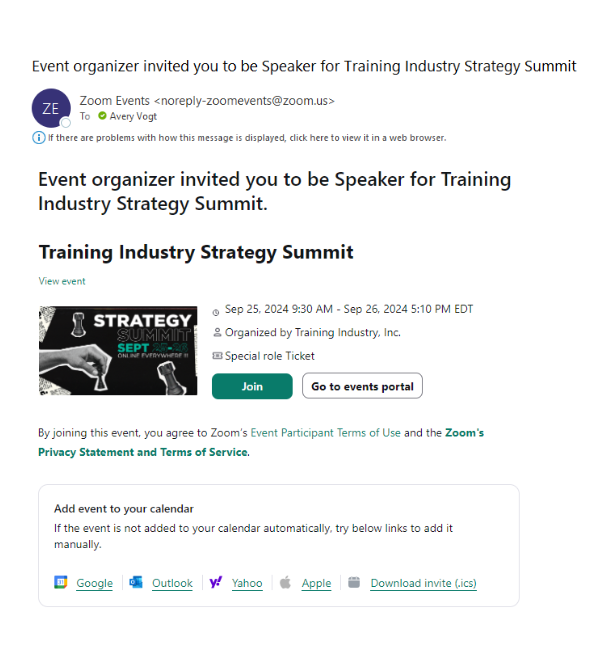
Follow these additional steps to access the event portal:
- Sign in with existing Zoom account or with one of the following:
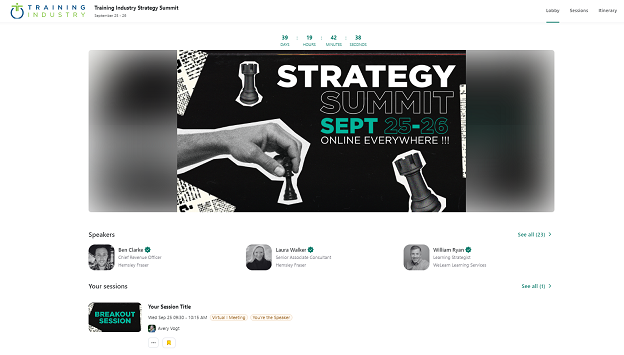
- You will be brought to the event lobby where you should see your speaker profile as well as any sessions you are associated with.
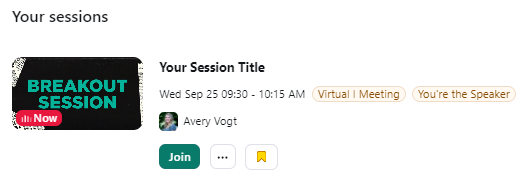
- You will not have the option to “join” your session until your producer opens the room. Once it is opened, you will see the below information. Click the “join” button to enter your session room. We will use the same session room for your tech rehearsal and live session.
- Once in the Zoom Events lobby, you can browse the full agenda and bookmark any sessions that you want to show on your itinerary. You can also view our exhibitor profiles, “walk” the expo hall, and browse speaker profiles.
CONTENT
We suggest the following best practices to make your session engaging:
- Provide digital handouts such as templates and tools.
- Consider standing up while you present to bring energy.
- Have links to resources ready to post in the chat as you speak.
- Use a “less is more” approach when creating your slide decks. To keep the audience’s attention, change slides frequently and only use slides to reinforce what you are presenting.
Use interactive elements to increase engagement:
- Use icebreakers to interact with your attendees.
- Incorporate live polls. Please send any poll questions to avogt@trainingindustry.com so she can add them to the Zoom portal.
- Post thought-provoking questions in the chat in the beginning and throughout your session.
- Use Zoom breakout rooms for attendee interactions.
Download the Strategy Summit PowerPoint Template
Final slide decks are due Friday, Sept. 20. Please email them to avogt@trainingindustry.com. If the file is too large to email, you can use WeTransfer to send the file.
Download the PowerPoint template below. You have three color themes to choose from.
*You are ONLY required to use the themed title slide and speaker slide (titled required framing slides above). However, you may choose to use the full template.
Required Framing Slides:
Purple Template
Green Template
Optional Templates:
Purple Template
Green Template
Download a Zoom Background
Choose from one of the Strategy Summit branded Zoom backgrounds here.
TECHNOLOGY
Breakout sessions will use Zoom. We ask presenters to:
- Test your computer audio and lighting.
- Lighting: Avoid sitting with your back to a window, instead face the window for the best lighting. If natural lighting is unavailable, have one steady lamp directly by your face.
- Position on camera: Make sure you are eye-level with the camera and don’t sit or lean too close to the webcam.
- Audio: Mute all other audio on your computer and phone. Consider using an external microphone for the best sound quality.
- Share your slide decks from your own computer during your session.
- Use the chat function to share links and pose questions to your audience. Both you and your attendees will have access to the chat to ask and answer questions. Your Training Industry producer can assist with posing chat questions and moderating Q&A if needed.
- Invite attendees to unmute their mic if they have a question.
- Stay in the session a few minutes after your presentation concludes. This is to allow attendees to have informal conversations with you and to foster networking.
We are here to support you with technology and prepping for your session:
- Each session will have a room host to operate as tech support. Additionally, they can help monitor the chat and manage breakout rooms.
- A tech rehearsal will be scheduled 1-2 week(s) before the event.
PROMOTE YOUR SESSION
Don’t forget to promote your session leading up to the event!
- You should receive a copy of your session social card directly from Avery.
- Use #TIStrategySummit and @trainingindustr to promote your session.
- Join our LinkedIn event page to start networking with attendees before the conference.