

Key Takeaways
- AI scales more effectively in L&D when teams use a governed framework instead of disconnected tools and workflows.
- Human judgment should remain central to instructional decisions, quality assurance and final approval.
- Clear workflows, review points and governance help organizations increase speed without sacrificing learning quality or accountability.
Generative artificial intelligence (AI) has gained ground quickly inside corporate training. Instructional designers (IDs) use it to draft storyboards. Localization teams run AI-assisted translation. Learning teams generate assessments, scripts and voiceover in a fraction of the time it used to take.
Yet most organizations still aren’t seeing meaningful scale from any of it, and the reason is usually structural: AI has been adopted as a set of disconnected productivity hacks rather than as part of a governed way of working. One instructional designer experiments with ChatGPT for storyboarding. Another uses Midjourney for visuals. Review cycles, instructional standards and quality checks stay exactly as they were. That gap between individual AI experimentation and organization-wide AI capability is what a real framework is supposed to close.
The problem is that most conversations about “AI frameworks” for learning and development (L&D) stop at the concept. Below is a working example, broken into its actual components, so you can see what building one really involves.
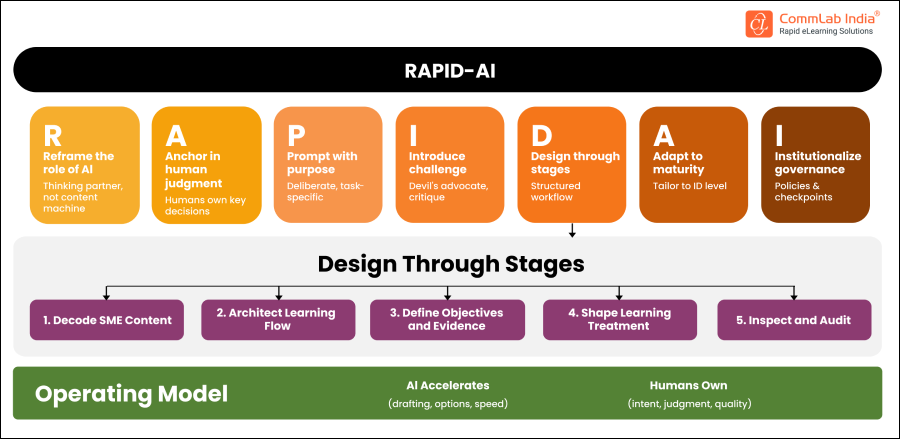
The RAPID-AI Framework Explained
CommLab India built RAPID-AI, short for Responsible AI-Powered Instructional Design, after watching the same pattern repeat across enterprise learning teams: AI sped up drafting, but without a defined structure, quality problems just moved further downstream.
The framework is not a tool or a piece of software. It’s an operating discipline: seven principles that define where AI adds speed and where human instructional judgment has to hold the line. To see how these principles work together and how enterprise L&D teams can apply them in practice, explore the complete RAPID-AI framework.
Here is each piece, and what it looks like in an enterprise L&D workflow.
R – Reframe the role of AI
Treat AI as a thinking partner, not a content machine. In practice, this means instructional designers stop asking AI to “write the course” and start asking it to generate options, alternative explanations or structural suggestions that a human then evaluates. The output is a starting point for judgment, not a finished decision.
A – Anchor in human judgment
Humans own the decisions that determine whether training will work: what the performance gap is, what the learner needs to do differently and whether the instructional approach fits the audience. AI can surface options but it can’t decide which option is right for this audience, this content or this business context. Teams that skip this step end up with polished courses that don’t move performance.
P – Prompt with purpose
Generic prompts produce generic output. Effective AI use in instructional design depends on task-specific prompting tied to a defined deliverable: a scenario structure, a knowledge-check format, a specific tone for a specific audience. This turns AI from a novelty into a repeatable production input.
I – Introduce challenge
Some of the most useful applications of AI in this framework aren’t generative at all. Teams use AI to critique a draft, flag gaps between objectives and assessments, or identify inconsistencies before a human reviewer ever sees the material. This catches errors earlier and reduces the volume of issues that reach subject-matter expert (SME) or instructional review.
D – Design through stages
This is the operational core of the framework: a five-stage workflow that defines exactly where AI accelerates and where a human finalizes, at every step of development.
- Decode SME content: AI decodes raw source material into a structured summary; the SME validates it for accuracy.
- Architect learning flow: AI suggests a possible learning flow; the instructional designer refines it based on audience and context.
- Define objectives and evidence: AI drafts learning objectives and assessment items; the instructional designer finalizes them against real performance requirements.
- Shape learning treatment: AI generates first-draft scenarios, visuals or scripts; the instructional designer curates and adapts them.
- Inspect and audit: AI audits the near-final product for gaps and inconsistencies; the instructional designer gives final approval before it moves forward.
At every stage, AI produces a draft and a human closes it out. That single rule is what keeps speed from becoming a quality risk.
A – Adapt to maturity
The framework isn’t applied uniformly. A junior instructional designer needs more structure and more checkpoints. A senior ID with strong judgment can move faster through the same stages with lighter oversight. Tailoring the framework to the skill level of the person using it is what makes it usable across an entire team rather than just a few power users.
I – Institutionalize governance
A framework that lives in one person’s head disappears when that person is unavailable. Institutionalizing it means turning the stages above into documented policies and checkpoints: what gets reviewed, by whom and at what point in the workflow.
This is also where a small set of non-negotiables sits. Outline specific points, such as final SME sign-off on accuracy or final instructional sign-off on objective-assessment alignment, where AI’s role stops regardless of deadline pressure.
Where AI Ends and Human Judgment Begins
Underneath the seven components is a simple operating principle that every team applying this framework has to agree on explicitly: AI accelerates drafting, options and speed. Humans own intent, judgment and quality.
This distinction sounds obvious until it meets a deadline. Under time pressure, it’s tempting to let an AI-generated draft skip a review step because it “looks” finished. The framework’s value is precisely in resisting that shortcut: a polished output is not automatically effective learning, and the only way to know the difference is to keep the human ownership points intact even when AI has done most of the drafting.
3 Levels of AI Maturity in L&D
Not every team needs to apply RAPID-AI the same way. The framework works at three levels, and most organizations move through them in sequence rather than jumping straight to the top.
1. Practitioner Method:
An individual instructional designer applies the seven principles to their own work: prompting deliberately, building in a self-critique step and finalizing their own outputs against the five-stage workflow. This is where most teams start, often informally, before anyone calls it a “framework” at all.
2. Team Operating System:
The framework becomes the shared workflow for an entire L&D function, applied consistently across programs, business units or regions. This is typically where the conversation shifts from ad hoc AI use to a discipline that can scale.
It’s also the level at which organizations start to feel the difference between having AI tools and having AI execution capacity — the ability to absorb a continuous stream of training requests across compliance, technical and sales enablement content without the quality variance that comes from every team improvising its own approach.
3. Client Advisory Framework:
At the most mature level, the framework becomes a model that L&D consultancies or internal centers of excellence use to advise other teams — including under real time pressure, such as a compliance deadline or a product launch that compresses a normal development timeline into weeks.
Speed without structure at this stage just multiplies inconsistency faster. The value of applying a governed framework, even to surge production work, is that acceleration doesn’t come at the cost of instructional quality.
How to Start Building an AI Framework for Your L&D Team
Building a framework like this doesn’t require a large program. It requires a small number of clear decisions, made deliberately instead of by default:
- Decide which stages of your development workflow AI is allowed to touch and write it down.
- Decide which decisions never move without human sign-off and make that list short enough that people actually follow it.
- Pick one workflow, not your whole content library, and run it through a structured AI-assisted process before scaling it further.
- Review what breaks. Most gaps show up in the handoff points between AI output and human review, not in the AI output itself.
None of this requires waiting for a perfect enterprise-wide policy. It requires treating AI adoption as an instructional design problem rather than a tooling problem, from the first project onward.
The Real Differentiator Is Discipline, Not Adoption Speed
Enterprise learning demand isn’t slowing down. Organizations are running workforce transformation initiatives, global rollouts and multilingual training programs with L&D teams that are frequently being asked to do more without proportional headcount. AI can absolutely help close that gap. But only for teams that have done the work of defining, in specific and repeatable terms, what AI does and what humans still own.
The organizations that pull ahead over the next few years won’t be the ones that adopted AI tools fastest. They’ll be the ones that built a governed way of using them — one where speed, quality and accountability all scale together, instead of one improving at the expense of the other two.


